Body
Microsoft Teams can display Teams of which you are a member in one of two available formats:
-
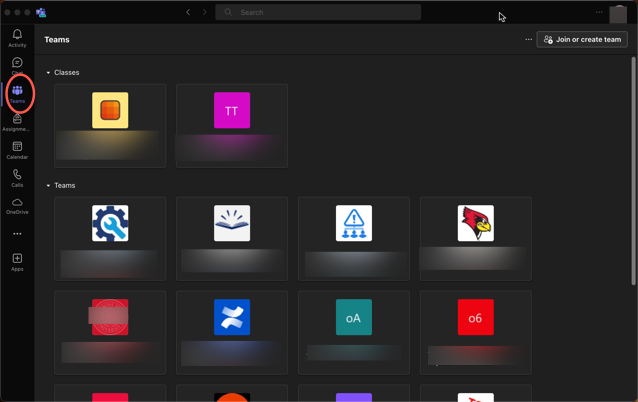
Grid View
- Grid view will display your Teams as tiles when the Teams tab is selected (Figure 1):
Figure 1:
-
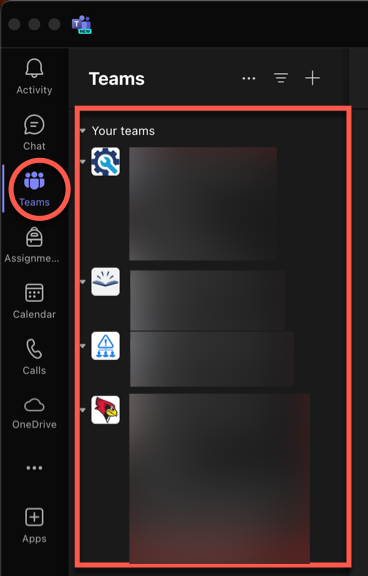
List view
- List view will display your Teams as a list when the Teams tab is selected (Figure 2):
Figure 2:
Switch Between Grid View and List View
You may toggle from Grid View to List View, an vice versa, as follows:
- Access Microsoft Teams Settings:
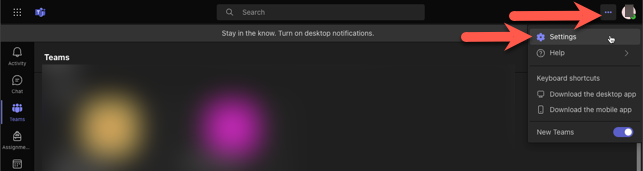
- Windows or Web Clients:
- Select the three dots next to your account icon in the upper-right and select Settings:
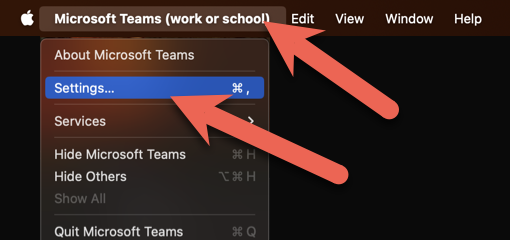
- MacOS Client:
- Select the Microsoft Teams menu at the upper left of the menu bar and select Settings:
- In Settings, select Appearance and Accessibility, then scroll down to the section labeled Layout and select either Grid or List:
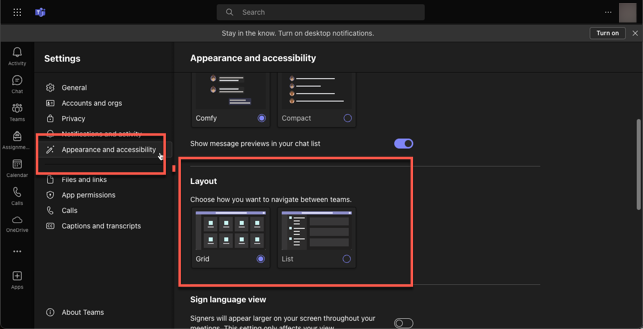
The next time you select the Teams tab on the left you will see your teams in the layout you selected.